

Table of Contents
ToggleI Want Smart Home Products… But What Do I Actually Buy First and What Works Together?
- What to buy first
- What actually works together
- Whether you truly need a speaker or a hub
- What to check before clicking “Add to Cart”
Can I Start Without Committing to a Big Ecosystem?
[ Your Phone ] ──> [ Manufacturer App ] ──> [ Smart Plug ] ──> [ Space Heater ON ]
- Turn devices on or off from anywhere
- Create automated daily schedules
- Monitor energy usage or device status remotely
Why You Eventually Need an Ecosystem
- Open App A to check the camera
- Open App B to close the curtains
- Open App C to turn on the air purifier
- Open App D to reset the smart plug
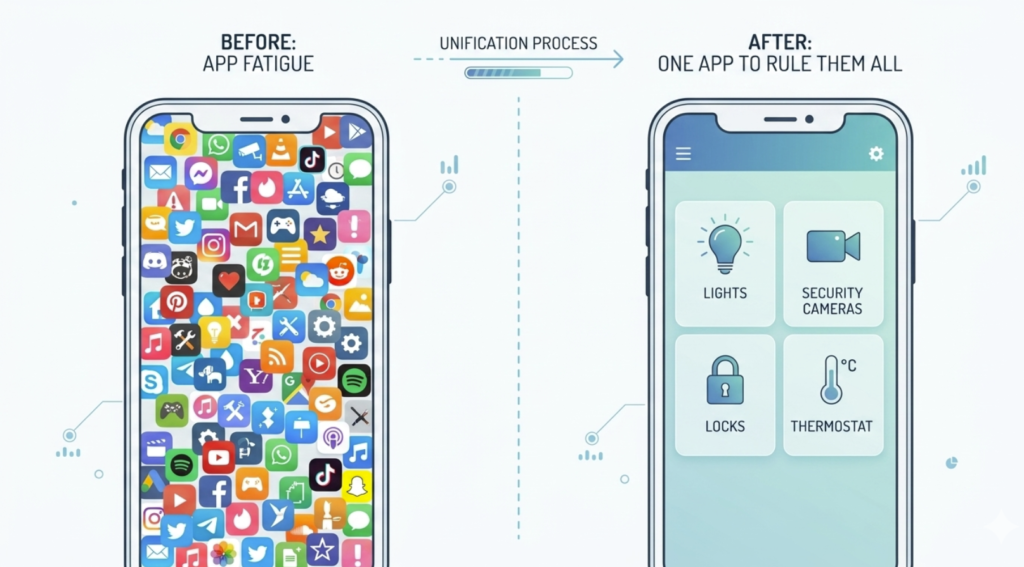
An Ecosystem solves this by acting as an umbrella. It pulls every random device into a single dashboard, giving you:
- One unified app to control everything
- One automation engine to link different brands together
- One voice assistant to hear your commands
                    ┌──> Tapo Camera
                    ├──> SwitchBot Curtains
[ GOOGLE HOME APP ] ├──> Levoit Air Purifier
                    └──> Philips Hue Lights
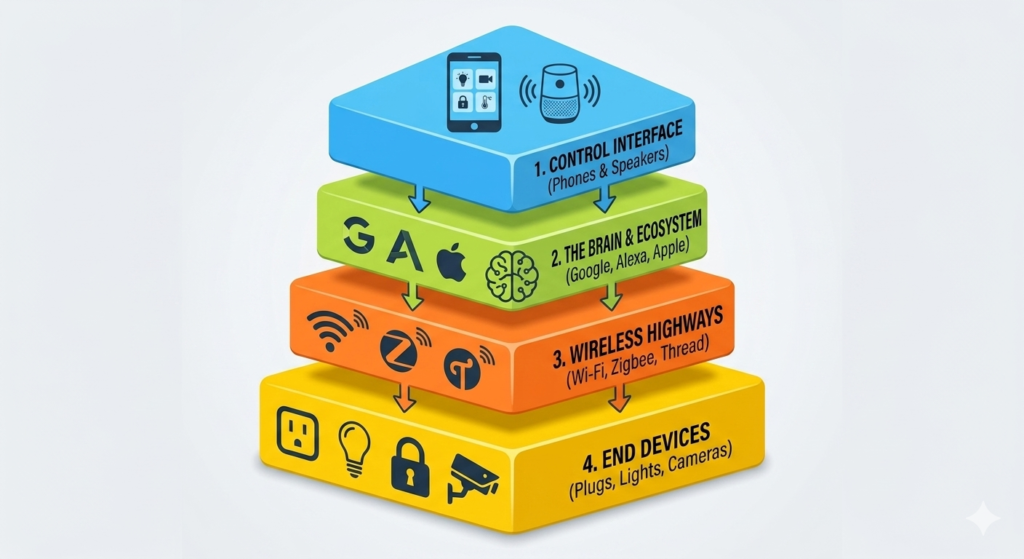
The 4-Layer Smart Home Stack Explained
- The User Interface: How you send a command (e.g., your smartphone screen or a physical smart speaker microphone).
- The Ecosystem & AI Brain: The cloud software that processes what you want and coordinates the rules (e.g., Google Assistant, Alexa, Siri).
- The Local Connectivity Network: The invisible wireless highway your devices use to talk to the internet or each other (e.g., Wi-Fi, Zigbee, Thread).
- The End Devices: The actual hardware performing physical work in your room (e.g., smart plugs, smart bulbs, motorized curtains, door locks).
Major Smart Home Ecosystem Products Compared
Product Category | What It Actually Is | What It Does For You | ||||
The Ecosystem App | Google Home app | Alexa App | Home app / HomeKit | Smart Things | The central control software engine | Provides your master dashboard, maps out automation rules, and tracks devices. |
The AI Voice Brain | Google Assistant | Alexa | Siri | Bixby | The virtual voice assistant software | Listens to spoken words, processes intent, and triggers actions. |
The Smart Speaker | Hands-free microphone + audio speaker | Listens for wake words across a room so you don't have to touch your phone. | ||||
The Smart Display | A touch screen + speaker + visual controller | Displays live security camera feeds, weather summaries, and quick-tap visual sliders. |
Do I Need Just the App, a Speaker, or a Hub?
- Phone App Only (Cost: $0): Perfect for true beginners. You control everything via screen taps and schedules on your phone.
- Phone + Smart Speaker (Cost: ~$40+): Adds hands-free voice control. You can shout commands while your hands are full cooking or cleaning.
- Phone + Hub Display (Cost: ~$60+): Perfect for visual control. Best for glancing at front-door security cameras, family calendars, or photo carousels.
- The Full Setup (Cost: Varies): Ultimate luxury. A Nest Hub sits on the kitchen counter for visual routines, while cheap Nest Minis sit in bedrooms strictly for voice coverage.
What Is Matter? (And Why You Should Care)
OLD WAY: [ Brand App ] ──> [ Google Cloud ] ──> [ Special Compatible Device Only ]

NEW WAY: [ Google, Alexa, or Apple ] ─── (Universal Language) ───> [ Any Matter Device ]
The Core Benefits of Buying “Matter-Approved” Hardware:
- True Universal Compatibility: A Matter-certified smart plug works with Google, Alexa, and Apple simultaneously.
- Ultra-Fast Local Control: Commands don’t always have to travel out to a distant internet cloud server and back; they cross your home network instantly [1].
- Zero Ecosystem Lock-in: If you switch your phone from an Android to an iPhone next year, your Matter smart home hardware transitions seamlessly with you [1].
Can Different Hardware Brands Work Together?
You say: "Hey Google, Good Night."
      │
      ├──> Tapo Camera: Arms security mode
      ├──> SwitchBot Motor: Closes the bedroom curtains
      ├──> Levoit Purifier: Switches to whisper-quiet sleep mode
      └──> Matter Smart Plug: Shuts down the energy-hogging space heater
The Smart Home Buyer’s Checklist
- Ecosystem Badging: Does the box explicitly say “Works with Google Home,” “Works with Alexa,” or feature the universal Matter logo?
- The Protocol Highway: Is it a direct Wi-Fi device (e.g., plugs straight into your router), or does it run on Zigbee/Thread (which requires you to buy a compatible bridge hub first)?
- Subscription Paywalls: Does the device require an ongoing monthly subscription to unlock basic core features (common with certain smart security cameras)?
- Physical Infrastructure: For smart light switches, does your wall box have a Neutral Wire? For smart curtains, is the motor compatible with your exact rod or rail style?
- Power Grid Specs: If importing global items, does the voltage match your wall outlets (110V vs 220V), and is the physical plug shape correct?
The Recommended “Get Your Feet Wet” Starter Bundle
- The Brain: 1x Google Nest Hub (2nd Gen) or Amazon Echo Show 8 (Provides your visual dashboard and voice mic).
- The Quick Win: 2x Matter-certified smart plugs (Instantly automates floor lamps, coffee makers, or fans).
- The Peace of Mind: 1x Budget indoor Wi-Fi security camera (e.g., Tapo or Wyze) to place by the front door.
- The Automation Spark: 1x Simple temperature/humidity sensor to automatically trigger your smart plugs when a room gets uncomfortable.
Final Thoughts
Disclosure: This article may contain affiliate links. If you purchase through these links, we may earn a commission at no additional cost to you.